Category

Technology & Equipment

How to Organize Files on Your iPhone Using Google Drive

iPhone screen showing folders in Google Drive app

If you’re a small business owner or a sales rep always on the move, you probably have tons of files saved across different apps, screenshots, and email threads on your phone. Finding the right file when you need it? That’s where things get messy.

In this blog post, I’ll show you a simple way to organize and sync your files using Google Drive on your iPhone. Even if you’re not tech-savvy, this quick setup can save you hours of future hassle.

Why Use Google Drive

Google Drive is a free cloud storage app that works seamlessly across devices. Once you upload a file, you can access it from your computer, iPad, or even another phone—without needing to email anything to yourself.

Why I Personally Recommend Google Drive

I know there are cheaper or more advanced options out there—but for beginners or solo users, Google Drive is honestly a lifesaver.

  • It’s cheap if you don’t need that much storage—especially for individual use.

  • It’s secure, as long as you take care of your email and enable two-factor authentication.

  • It’s packed with useful features, like document scanning, offline access, and seamless sharing.

For someone just getting into cloud storage, this is the easiest entry point, and it works well right out of the box.

Step 1: Download Google Drive on Your iPhone

Go to the App Store and download the Google Drive app. Log in with your Google account. (If you already use Gmail, you’ve got one.)

Step 2: Set Up Folders for Easy Access

Think of this like setting up digital drawers. Tap the “+” icon in the app and select “Folder.”
Name your folders something easy to recognize, like:

  • Client Contracts

  • Product Photos

  • Receipts and Invoices

  • Marketing Materials

This is your first step toward a cleaner, more organized workflow.

Step 3: Upload Your Files

Inside any folder, tap “+” and then “Upload.” You’ll have options to:

  • Upload Photos and Videos

  • Upload files from your Files app

  • Use your Camera to scan physical papers into PDFs

It’s a fast way to back everything up in the cloud.

Step 4: Access from Any Device, Anytime

Once your files are in Google Drive, they’re available from any device—just log in to your account. Whether you’re using a laptop, iPad, or new phone, your documents go with you.

Bonus Tips to Stay Organized

  • Star important files for quick access

  • Use the search bar to find documents by name or content

  • Turn on offline access for files you need when there’s no signal


Final Thoughts

Organizing your files on iPhone using Google Drive is one of the easiest upgrades you can make to your workflow. It’s not just about saving space—it’s about saving time and reducing stress.

I’ve used other storage platforms before, but for entry-level users, Google Drive really strikes the right balance of simplicity, price, and features. If you’ve been putting this off because it “sounds complicated,” give it a shot. It only takes a few minutes to set up, and you’ll thank yourself later.

RTP network to raise transaction limit

RTP network to raise transaction limit

Funding even on bank holidays with True Daily Funding

With a calendar full of holidays ahead, now is a great time to remind your customers that they no longer have to work around bank holidays to access their cash when they need it.

Powered by the Real-Time Payments (RTP) network, Elavon’s True Daily Funding solution allows businesses to receive their funds within hours of a batch submission, seven days a week – even when banks are closed.

Beginning later this month, RTP will raise its transaction limit to $10 million – a tenfold jump from the current $1 million cap.

As long as the merchant’s bank is a participating institution, they can get access to their funds faster. At a time when more control over cash flow is critical to small- and medium-sized businesses trying to stay afloat, fast funding can help with making payroll, paying utilities, attending to unexpected emergencies or establishing more efficient business management practices.

Unlike some providers that offer a same-day funding option but charge a transfer fee of 1.75% of the batch each time the service is used, Elavon’s True Daily Funding solution has a competitive monthly fee instead of a hefty per-occurrence percentage fee.

How to report a problem with a terminal

How to report a problem with a terminal

When a customer experiences a problem with an Elavon payment terminal, we want to diagnose and fix the issue as quickly as possible. Reporting terminal issues promptly is critical, as they may prevent the customer from processing payments—significantly disrupting their business.

Here are the key steps involved in reporting a terminal problem:

1. Call Elavon
Customers experiencing a terminal problem can call our Customer Care team directly at 1-800-725-1243 and get help around-the-clock, 365 days a year. If you (a partner) want to contact us on the customer’s behalf, you can call the applicable number:

U.S. MSPs: 1-800-819-6019 (Option 1)
Canada MSPs: 1-866-849-3808

Whoever calls should know the merchant ID and be ready to describe the problem. Standard caller validation applies.

2. Be ready with the error message.
The most important information to provide when calling Elavon is the error message displayed on the terminal, as well as any additional details about the problem. The error message helps our team more quickly and accurately diagnose the issue and work to resolve it.

3. Expect prompt resolution.
Elavon’s team works as fast as possible to troubleshoot any terminal issues. If the problem can’t be resolved over the phone, Customer Care or Premier Service may arrange to ship the customer replacement equipment for next-day arrival to limit any disruption to their payment processing.

We want to ensure customers have a smooth, rewarding experience, so promptly resolving any terminal issues is very important to us.

How to avoid ‘VAR pends’ when onboarding merchants

How to avoid VAR pends when onboarding merchants

From the Desk of Paul Ladd, Sales Support Manager

It’s important to know that as you’re onboarding a merchant, you’ll need to include information about its value-added resellers (VARs) — any software it uses that holds cardholder information. If that information is missing, unclear or incorrect, it could delay that merchant’s application by at least 24 hours.

This delay is called a “VAR pend” and it’s in your best interest to avoid it. For one, it can create a poor experience for that merchant by requiring you to ask them for more information. So, how do you prevent VAR pends?

Here are three best practices:

1. Collect the necessary VAR details. Make sure to ask a merchant up front for the information about each VAR you need to list. This includes the software name, the vendor name, and whether the software is installed on the merchant’s hardware or if it’s cloud hosted. (If installed, we ask for the software version as well.) Partner Sales Support is here to help if you aren’t sure what questions you need to ask.

2. Confirm the information is correct and clear. Listing a software or vendor name that doesn’t match what Elavon has on file is the most common reason for a pend. If you’re unsure if a name is spelled correctly, you can check if that software is in our WorksWith Elavon platform. Seller instructions contain step-by-step guidelines on how to board those accounts and, when followed, rarely lead to a pend. You can also do independent research to confirm the names and correct spelling.

3. Use electronic application software. Submitting a merchant application using a tool like SAT or PulsePoint reduces the odds of a pend because it uses an automated exception process to try to clear any missing or unclear VAR information.

If you are unable to find the necessary details about a VAR and need assistance, feel free to contact us at partnersalessupport@elavon.com.

PCI DSS: A Critical Part of Fraud Protection

PCI DSS

In today’s landscape of increasing fraud, the Payment Card Industry Data Security Standard (PCI DSS) is more important than ever for business security. Educating customers about PCI DSS can strengthen relationships and improve retention.

What is PCI DSS?

PCI DSS encompasses technical and operational requirements for security management, policies, procedures, network architecture, software design, and other protective measures. These are crucial for preventing credit card fraud, hacking, and other security threats.

Why Educate Customers?

Educating customers about PCI DSS helps them understand the value of these standards in maintaining secure payment environments. For self-education, refer to the PCI Compliance and Validation QRG. Share this resource with customers new to the topic. For those with a basic understanding, recommend the Merchant Resources page on the PCI Security Council website for deeper insights.

Importance of PCI DSS Annual Validation

PCI DSS validation is a snapshot in time. As businesses evolve, their security measures must adapt. Encourage customers to conduct periodic reviews and revalidate their compliance regularly to stay protected.

Customer Tips for Securing Payment Devices

With increased foot traffic in warmer weather, remind customers to secure their point-of-sale terminals:

  • Location Matters – Place payment devices in easily monitored and controlled areas.
  • Secure Devices – Use cable trays and securing mechanisms.
  • Alarm Systems – Physically secure and alarm all remote or self-service payment environments.
  • Routine Inspections – Maintain a list of all payment devices and inspect them regularly for tampering or substitution.
  • Secure Storage – Store devices securely when not in use, such as in a locked cabinet or under surveillance.
  • Record Attributes – Document the serial number, model, operating system, and authorized user information for each device.

Reporting Lost or Stolen Devices

If a payment device is lost or stolen, customers should:

  • Contact Law Enforcement – File a police report and retain it for further instructions.
  • Notify Premier Services – Report the incident and request the Terminal ID (TID) be deleted from the host to prevent transactions.
  • Replace the Device – Submit an Add Equipment Services (AES) request to replace the missing device.

Benefits of Reporting Security Events

Reporting incidents allows Elavon to evaluate the impact and take necessary actions, such as account notifications or closures, to protect personal information. Failure to report can expose businesses to reputational risks, negative press, and dissatisfied customers.

Educating customers about PCI DSS and the importance of securing their payment devices is essential in today’s fraud-prone environment. By promoting regular validation and security measures, businesses can maintain strong, secure relationships with their customers.

Uncovering Payment Fraud: Red Flags and Protective Measures for Merchants

As the prevalence of payment fraud continues to rise, merchants face the imperative to stay vigilant and take proactive measures. Recognizing key red flags and swiftly responding can shield businesses from potential financial losses. This condensed guide offers crucial insights to help merchants navigate the complex landscape of payment fraud.

Payment Fraud Red Flags to Watch For:

  1. Unusual Order Patterns:
    • Detect large quantities of the same item or bulk orders to unconventional addresses.
    • Merchants should pay attention to unusual order patterns, such as large quantities of the same item or bulk orders with delivery to unconventional addresses.
  2. Multiple Card Numbers:
    • Identify customers providing several card numbers for a single purchase, especially with minor variations.
    • Multiple card numbers for a single purchase, especially with minor variations, can be a clear indicator of potential payment fraud.
  3. Expedited Shipping Requests:
    • Be cautious of requests for overnight delivery without cost considerations.
    • Merchants should exercise caution when receiving requests for overnight delivery without proper cost considerations.
  4. Urgent Processing and Tracking:
    • Address customers demanding immediate order processing and requesting tracking information ASAP.
    • When customers demand immediate order processing and request tracking information ASAP, merchants should scrutinize the transaction for potential fraud.
  5. Phone Orders with Immediate Pick-Up:
    • Look out for placing urgent phone orders and arranging immediate in-person pick-ups.
    • Placing urgent phone orders with immediate in-person pick-ups can be a red flag for potential payment fraud, and merchants should investigate such instances carefully.
  6. Alternate Shipping Addresses:
    • Investigate requests for delivery to addresses other than the billing address or to freight forwarders.
    • Merchants should thoroughly investigate requests for delivery to addresses other than the billing address or to freight forwarders to mitigate the risk of payment fraud.
  7. Unusual Product Requests:
    • Flag orders for items not typically sold by the merchant, particularly high-risk items like cell phones or laptops.
    • Merchants should be on high alert for orders of items not typically sold, especially high-risk items like cell phones or laptops.
  8. Free Email Services:
    • Be cautious of communication via free email services (Yahoo, Hotmail, Gmail), indicating potential fraud.
    • Communication via free email services (Yahoo, Hotmail, Gmail) should be approached with caution, as it may indicate potential fraud.
  9. Relay Calls:
    • Exercise caution with orders obtained through relay calls, recommending a Code 10 authorization.
    • Merchants should exercise caution with orders obtained through relay calls and strongly consider implementing a Code 10 authorization in such cases.

Taking Action with Code 10 Authorization:

  • Initiating Code 10:
    • Call the Voice Authorization phone number and choose the prompt for Code 10.
    • Merchants should be familiar with initiating Code 10 by calling the Voice Authorization phone number and choosing the prompt specifically designated for Code 10.
  • Questioning Process:
    • Answer yes/no questions about the transaction.
    • During the questioning process, merchants should be prepared to answer yes/no questions about the transaction to facilitate the Code 10 authorization.
  • Status Update:
    • Merchants receive a status update within 24-72 hours.
    • After initiating Code 10, merchants can expect to receive a status update within 24-72 hours.
  • Authorization Declined:
    • If declined, request an alternative payment method.
    • In case of authorization being declined, merchants should promptly request an alternative payment method from the customer.
  • Preventive Measures:
    • Initiate Code 10 before shipping to avoid processing fees and shipping costs on questionable transactions.
    • To avoid processing fees and shipping costs on questionable transactions, merchants should proactively initiate Code 10 before shipping.
    • Note that initiating Code 10 post-shipping reduces chances of product recovery.
    • It’s crucial to note that while merchants can still request a Code 10 post-shipping, the chances of product recovery may be reduced.

Additional Prevention Tips:

  1. Unusual Purchasing Patterns:
    • Monitor orders deviating from typical buying behavior.
    • Merchants should consistently monitor orders that deviate from typical buying behavior, as these may indicate potential payment fraud.
  2. Geographical Inconsistencies:
    • Be cautious of orders with distant billing and shipping addresses.
    • Exercise caution with orders exhibiting distant billing and shipping addresses, as these may raise suspicions of potential fraud.
  3. IP Address Monitoring:
    • Watch for multiple transactions from the same IP address.
    • Vigilantly watch for multiple transactions originating from the same IP address, as this could be indicative of fraudulent activities.
  4. Data Security Measures:
    • Implement tokenization, encryption, and regular security updates.
    • To enhance data security, merchants should implement robust measures such as tokenization, encryption, and regular updates to security protocols.
  5. Fraud Detection Systems:
    • Invest in real-time fraud detection systems.
    • Investing in real-time fraud detection systems is a proactive approach that can significantly bolster a merchant’s ability to identify and prevent potential fraud.
  6. Customer Authentication:
    • Utilize multi-factor authentication for online transactions.
    • Merchants should prioritize the utilization of multi-factor authentication for online transactions to add an extra layer of security.

Conclusion: Fraud prevention demands an ongoing effort, blending technology, education, and proactive monitoring. Merchants must adapt their strategies to evolving threats, employing a multifaceted approach to secure transactions and safeguard against potential losses. Stay informed, educate your team, and implement robust security measures to fortify your business against payment fraud.

Cybersecurity Awareness Month

October is Cybersecurity Awareness Month: Tips for maintaining payment data security

For the past 19 years, the National Cybersecurity Alliance and the U.S. Cybersecurity & Infrastructure Security Agency have recognized October as National Cybersecurity Awareness Month to promote data security best practices. Throughout the month, small business owners and corporate leaders should take time to learn the risks, identify gaps in security practices, and implement new strategies to fend off cyberattacks. Businesses that accept and process large volumes of payments – especially retailers, restaurants, and e-commerce marketplaces – need to be especially vigilant of fraud attempts and cybercrime. According to a recent study from Card Not Present, every dollar of fraud committed in e-commerce transactions represents $3.75 in losses to the merchant – representing a marked increase from 2019.

With that in mind, spend some time ensuring that your organization evolves its data security practices and reduces the risks of payments fraud – this month and throughout the year. Get started:

Stay up to date with emerging payments fraud risks and impacts

Cybersecurity Awareness Month: Business leaders are generally aware of the reputational and operational risks of fraud – but may underestimate the magnitude of these potential losses. The annual IBM Cost of a Data Breach report shows the massive costs organizations incur after cybersecurity incidents. The report estimates that in 2022, companies lose $4.35 million per data breach event and 83% of surveyed companies had experienced more than one data breach event in the past year.

To avoid reputational, operational, and financial losses, keep yourself informed on the most pressing sources of cybersecurity risk:

  • Digital skimming: Fraudsters infect a website with code that “skims” payment card information while it is being entered into a website during payment, while the merchant and cardholder remain unaware.
  • Ransomware: Harmful code infiltrates and disables an organization’s computer system and holds the data hostage to collect a ransom payment from the organization.
  • Card not present fraud: Attackers leverage online, over-the-phone, and mail-in purchases to conduct fraudulent transactions – relying on the fact that the merchant never sees a physical card as part of the verification process of a payment.

There are no easy answers for combating these threats, but constant vigilance can help. This includes regularly scanning and testing eCommerce sites for vulnerabilities or malware and monitoring the eCommerce environment. For a deeper dive into data security treats, Forbes online news magazine featured the top data security threats of 2022.

Audit your current practices and establish regular check-ins for ongoing security.

Original data security precautions can be thwarted by shifts in store setup, device additions, expansion and administration of eCommerce services, new payment access points and changes to operational procedures. Any one of these can leave a business more susceptible to security control failures, malicious attacks, or accidental information leakage. So, begin looking at what’s changed for your business this year that could have inadvertently created a weak point in your data security set up.

  • Physical device security: Mount payment devices on locking stands and place in locations that you and your staff can see and control to minimize risk of tampering or theft. Also, maintain a list of all devices and develop a routine to inspect them for tampering or substitution. When not in use, store mobile payments devices in locked cabinets or tether to the counter securely. Record the identifying attributes of the device – serial number, model type, operating system, etc. – and regularly review who is authorized to use it.
  • Ecommerce website security: Check your shopping cart software, update operating system versions in a timely fashion, remove inactive plugins as soon as possible, and make sure your SSL certificate is current and renewed on time each year. If you use an outside vendor to develop and maintain that site, be sure the coders don’t leave HTML source code wide open for fraudulent authorization testing. It is important to ensure your source code is well hidden.
  • Employee access security: Validate your processes for strong passwords and user authentication, as well as employee access and logins, and consider implementing multi-factor authentication. Train employees to recognize risk, such as Phishing and social engineering, and how follow appropriate security protocols.
  • PCI DSS compliance validation and patches: Review your organization’s adherence with the Payment Card Industry Data Security Standards (PCI DSS) compliance on a quarterly basis. PCI validation only reflects a point in time and must be diligently upheld with consistent frequency to ensure payments data security. If you find gaps in your processes during these reviews, make a plan to address these quickly and effectively to maintain compliance and customer trust. Further, make sure you understand how your vendor or service provider notifies you of new security patches and be sure you receive and read these notices. For eCommerce businesses, ask your eCommerce hosting provider whether they patch your system and how often.

Cybersecurity Awareness Month will go by quickly – be sure to make these best practices part of your organization’s regular processes to ensure data security year-round. Educating your employees, discussing data security with your partners and vendors, and prioritizing fraud-preventing initiatives are vital steps to protect your organization in the evolving digital-first world.

Card Declines

A few things can cause checkout anxiety, but I say the top two are not being able to put your change away fast enough before the next customer and being greeted with a significant fat decline across the receipt. Most of us have had it happen for tons of various reasons at one point or another. credit card declines

No one likes a decline message, so customers must be shown some discretion while finding an alternative. Business owners need to be prepared to handle such situations; luckily, most declines are resolved efficiently. Losing a sale may be a disappointment but having that customer ditch your business for another based on poor handling of a crappy situation is a worse fate.

Visa and Mastercard report an average of 15% of recurring payments are declined, but the rate can be double that for some industries. In addition, there is a wide array of reasons why a card may be denied. When a card is declined, it is by the issuing bank, processor, or the payment gateway.

Types of Card Declines

Hard decline

This happens when the bank doesn’t approve the transaction. Reasons could be related to a maxed-out credit card, data entry error, or fraud. This situation calls for a new payment method; trying to rerun it will yield nothing.

Hard declines typically need the payment card information to be updated regardless of the number of retries attempted.

Soft decline

A soft decline happened when the bank authorized the payment, but the transaction failed elsewhere. Think of it as a relay race rat race if the last person doesn’t complete their leg, the team is disqualified and doesn’t cross the finish line. The steps that occur at each transaction can fail with no fault of the consumer or the issuing bank. Soft declines are usually resolved by trying the traction again. Just remember trying more than three times is not a good practice.

Types of soft declines

Insufficient Funds

This happens when the customer does not have sufficient funds in their account to cover the transaction. This is the most common and most embarrassing for the customer to experience.

Unusual Purchase
Sometimes when a purchase is made out of your home state or doesn’t align with past buying behavior, the banking institution will flag and block the transaction to negate fraud. Then, a quick phone call or visit to the app (if they have one) can verify the purchase or travel notice allowing the customer to continue as usual.

AVS or Billing Address Issue
For card-not-present transactions, online payment gateways require extra validation to prove that the transaction is a legitimate credit or debit card used. Banks will typically block transactions outside of that card’s billing address.

Types of hard declines

Stolen or fraudulent card
The bank will mark a card as stolen or fraudulent, so it will be blocked when a purchase is attempted, whether for in-person sales or online transactions.

Invalid card
Usually, the result of a typo, invalid card declines, concerns about incorrect card numbers, CVV verification numbers, or other card details.

Reasons behind a credit card decline

The user met the credit limit.

If there isn’t enough available credit, the card will be declined.

Large purchases
An account can get flagged for a large purchase. If it seems outside of the customer’s normal spending behavior, it can trigger fraud and freeze the account, which declines the transaction.

Expired Card

An expired card will always end in a failed transaction. This is because the card network cannot process a card that has expired.

Missed payments
If you have a less than stellar credit history and are a few days past due on your bill, any attempted transaction would be declined. Not only does the missed payment hurt your credit score, but it also can prevent you from using the card.

Check the customer’s information.
Sometimes if the numbers were keyed in, they could have been transposed or off just a little. Confirm with the customer that the billing and zip code and the CVV code are correct.

Confirm the card is valid
Check the information on the card to make sure it lines up correctly. We use the same card for years, so it can expire without us even realizing it. If the information is correct, the customer must contact their bank and use an alternative payment method.

Should you try the transaction again?
A declined card will not go through no matter how many times you swipe it. The best solution is to have the customer call the card issuer to find the potential issue. Once that has been resolved, you can rerun the card.

Widen your payment options
Offering multiple payment options such as digital wallets can help expand your customer base.


In a survey conducted by CompareCards.com, one in five American consumers has declined a credit card at least once in the past 12 months. That is more than 40 million people!

Treating customers with discretion and being gentle with the situation regardless of the decline will help customers feel at ease. Approximately 15% of shoppers will go to a different retailer after experiencing a decline, causing merchants to lose out on a sale. By being as respectful and helpful to find a resolution as quickly as possible will help your customers feel that they are in a safe and judgment-free environment. 

Survival of the Adaptors

Talech Mobile

Survival of the Adaptors

Everyone is talking about supply chain interruption, how chip shortages are affecting tech, and the ports are backed up. Long story short, they’re saying that holiday shopping this year is going to be different. That’s great for the consumers to plan earlier shopping strategies, but what are the small businesses supposed to do to get by?

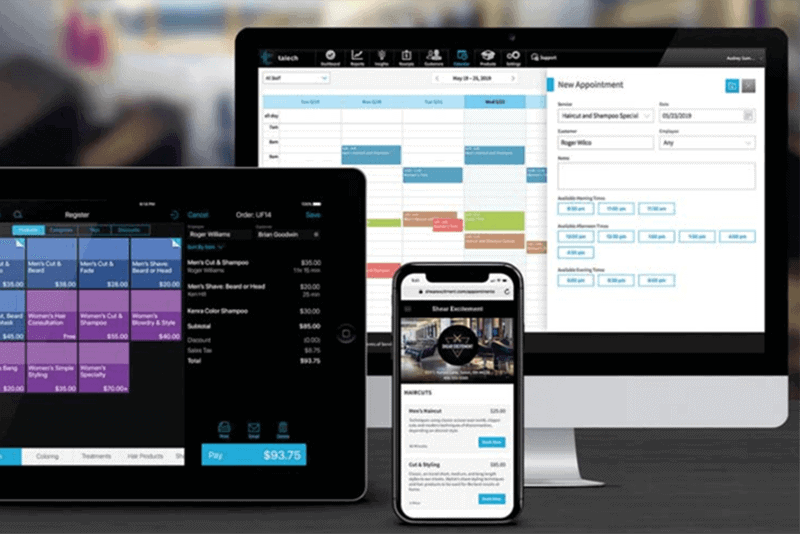
One option is using Talech point of sale  and its AI tools to stay dialed in on inventory and adjust sales accordingly. In addition, it syncs with ease to tablets, iPad, smartphones, and quite a few point of sale setups offering a more flexible way to accept payments.

Link your Talech point of sale software to your chosen device and sit back and watch the magic. Just think of what you could do with real-time business analytics?! Have order placements, checkout, payment information, and simple-to-read reports all in one place. For. Free. See the flow of products straight from the dashboard to zone in on customer trends.

Here are a few examples of what the data can do for you:

  • Compare inventory and goods sold to keep stock up to date.
  • See what is a hot seller or what is sitting on the shelf for too long.
  • Track the results of promotions, revenue, inventory, and staffing.
  • Know who will be the employee of the month with the highest sales.

If you want to scale up, Talech will help you do that quickly. The information provided will allow you to adjust purchase points to stay profitable, meet customers’ expectations and lower the amount of money tied up in inventory.

Did you know?

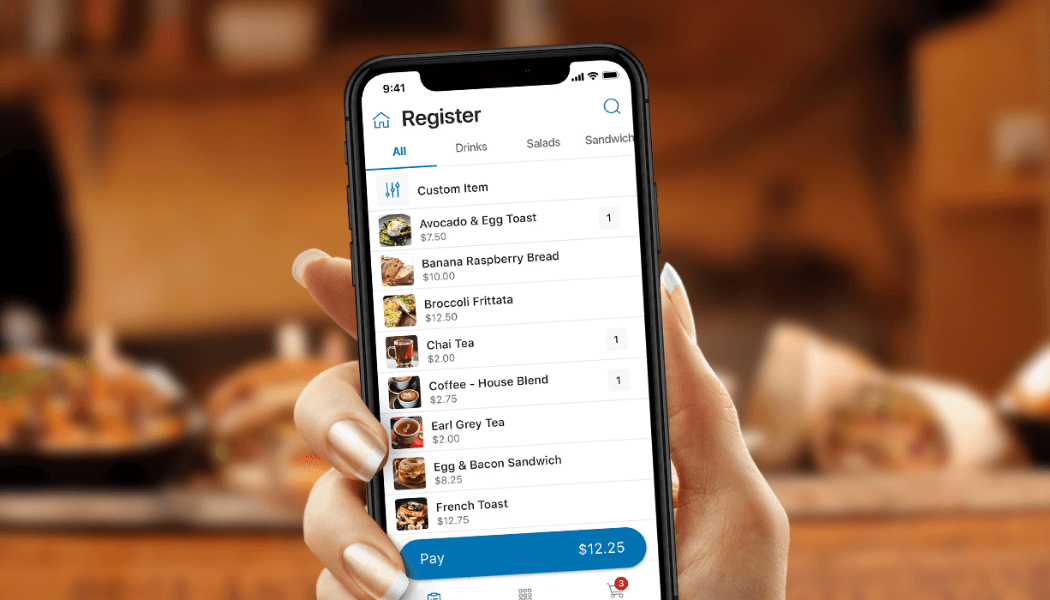
Talech Mobile is a free version of the software available through any smartphone’s App Store that provides business analytics and insights, but not at a level as robust as a paid version of talech. A customer needs an inexpensive, chip-enabled Bluetooth card reader for securely accepting payments on their smartphone.

Much like last year, this holiday season is sure to look unlike any other in a new way. While concerns about health and safety have relaxed since the previous year, pandemic-influenced shopping behaviors continue to gain traction.
Most businesses figured out how to adapt to new ways of serving their customers; however, implementing those practices when market peaks will all hinge on a well-thought-out plan.

For our eCommerce friends, think about adding the option to buy online and pick up in-store. Some people prefer to browse online, check reviews, and then go to the store for pick up. This is great for online shoppers who don’t wait to wait for shipping.
The smaller inventory club that doesn’t want to store card information or a home-based business should consider a “Buy” button for easy checkout. It’s simple to add to a webpage that doesn’t require an investment of time and money on a more advanced payment system.

If you’re rocking the brick and mortar stores, you can say sayonara to checkout lines and social distancing. This allows customers to check out wherever they happen to be, whether outside, curbside, tableside, literally anywhere. Make sure to consider the customers who need to make contactless payments as well.

Schedule a time to have a payment professional do a free analysis and if we can help!


Data Privacy Policy Agreement.

Applicant Privacy Policy
English


Legal Disclaimer
Effective Date: January 1, 2021
This Applicant Privacy Policy (the “Policy”) describes the practices of Platinum Operating Company, LLC d/b/a Platinum Payments (“Company”) regarding the information that is solely collected through the Platinum Workforce Now portal (“Careers Site”) in connection with your application for a job or internship with us.


1. CATEGORIES OF INFORMATION WE COLLECT THAT YOU PROVIDE
We may collect the following information from you in connection with your application through the Careers Site: Name, e-mail address, mobile number, work authorization status, resume, profile information (e.g. work experience, education, skills, licenses & certifications, and memberships), professional and other work-related licenses, permits and certifications, references, and any other information you elect to provide to us (e.g., employment preferences, willingness to relocate, current salary, desired salary, awards, or professional memberships).
If you do not provide sufficient information, we may be unable to consider your employment application.
However, please avoid submitting the following information that may qualify as sensitive information under applicable law, except where such information is legally required: information on race, religion, ethnicity, nationality or national origin, age, gender identity, sex life or practices or sexual orientation, marital status, medical or health information (including disability status), genetic or biometric information, biometric templates, political or philosophical beliefs, political party or trade union membership, background check information, judicial data such as criminal records or information on other judicial or administrative proceedings, and veteran status.
If the personal information you provide contains details of the information referenced in the preceding paragraph or your job evaluations or educational records, you authorize us to handle such details for the purposes of your job application.
Any information you submit through the Careers Site must be true, complete and not misleading. It is your responsibility to ensure that information you submit does not violate any third party’s rights.
If you provide us with personal information of a reference or any other individual as part of your application, it is your responsibility to obtain consent from that individual prior to providing the information to us.


2. USE OF INFORMATION / LEGAL BASIS
We collect and process information about you for the following reasons:
a) Because you voluntarily provide this information;
b) Because this information is necessary to take steps at your request prior to entering into an employment or internship;
c) Because this information is of particular importance to us and we have a specific legitimate interest under law to process it;
d) To comply with a legal obligation; or
e) Where necessary to protect the vital interests of any person.
The information that you submit on the Careers Site will be used for our personnel recruitment, management, and planning purposes, as permitted by local law, including:
• To process your application;
• To assess your capabilities and qualifications for a job;
• To conduct reference checks;
• To respond to your inquiries and communicate with you about your application, and to send you information regarding the Careers Site and changes to our terms and policies;
• To comply with or monitor compliance with any applicable law or regulation;
• To conduct background checks if we offer you a position; and
• To preserve our other legitimate interests, for example, for our administrative purposes, aggregate management reporting, internal training, and as generally required to conduct our business.
The information about you will be added to our candidate database. If you do not wish us to do this, please contactwendy.clawson@ptpay.us.
If we hire you, personal information we collect in connection with your application may be incorporated into our human resources system and may be used to manage the new-hire process; any such information may become part of your employee file and may be used for other employment-related purposes.
We may also use the information as we believe to be necessary or appropriate: (a) under applicable law, including laws outside your country of residence; (b) to comply with legal process; (c) to respond to requests from public and government authorities including public and government authorities outside your country of residence; (d) to protect our legal rights and operations or the rights, privacy, safety or property, and/or of us, you, or others; and (e) to allow us to pursue available remedies or limit the damages that we may sustain.


3. DISCLOSURE OF PERSONAL INFORMATION
We may share personal information with affiliates and/or partners that are involved in and/or for performing pre-employment, post employment processes in compliance with state and federal law, evaluating candidates for a given position and to track employee and/or contractor performance and progress. We will make the information available to personnel with a business need to know the information, including personnel in the recruiting, human resources, and information technology departments, and in the department responsible for the position for which you are applying and for which you, if hired on an employee or contract basis, hold.
We may share personal information with third-party service providers who provide services such as hosting and operating the Careers Site, recruiting assistance, background check processing, Work Opportunity Tax Credit, eVerify, Equal Employment Opportunity Commission, and any other governmental programs the business elects for voluntary or compliance purposes and similar services.
We also may share personal information as we believe to be necessary or appropriate: (a) under applicable law, including laws outside your country of residence; (b) to comply with legal process; (c) to respond to requests from public and government authorities including public and government authorities outside your country of residence; (d) to protect our legal rights and operations or the rights, privacy, safety or property, and/or of us, you, or others; and (e) to allow us to pursue available remedies or limit the damages that we may sustain.
We may transfer information in the event of any reorganization, merger, sale, joint venture, assignment, transfer or other disposition of all or any portion of our business, assets or stock (including in connection with any bankruptcy or similar proceedings).
Disclosing your personal information may include transferring personal information to other countries (including countries other than where you are based that have a different data protection regime than is found in the country where you are based). If you are located in the European Economic Area (the “EEA”), this may include countries outside of the EEA.


4. DATA RETENTION
We keep your personal information for as long as needed or permitted in light of the purpose(s) for which it was obtained. The criteria used to determine our retention periods include (i) for as long as we have an ongoing relationship with you (such as an application process); as required by a legal obligation to which we are subject; or as advisable in light of our legal position (such as in regard of applicable statutes of limitations, litigation, or regulatory investigations).
We may remove personal information for inactive accounts, subject to any applicable legal or regulatory obligations. Furthermore, we may delete personal information about you (including your CV/résumé) from our database at any time and without providing any reason. Therefore, please retain your own copy of the personal information provided to us.


5. PASSIVE INFORMATION COLLECTION: COOKIES AND TRACKING TECHNOLOGY
When you visit the Careers Site, we collect certain information by automated means. Cookies are small text files that websites send to your computer or other internet-connected device to uniquely identify your browser or to store information or settings in your browser. Cookies allow us to recognize you when you return. They also help us provide a customized experience and enable us to detect certain kinds of fraud. In many cases, you can manage cookie preferences and opt-out of having cookies and other data collection technologies used by adjusting the settings on your browser. All browsers are different, so visit the “help” section of your browser to learn about cookie preferences and other privacy settings that may be available.
We also use Flash Cookies (also known as Local Stored Objects) and similar technologies to personalize and enhance your online experience. The Adobe Flash Player is an application that allows rapid development of dynamic content, such as video clips and animation. We use Flash Cookies for security

purposes and to help remember settings and preferences similar to browser cookies, but these are managed through a different interface than the one provided by your web browser. To manage Flash Cookies, please see Adobe’s website at http://kb2.adobe.com/cps/526/52697ee8.html or visit www.adobe.com. We do not use Flash Cookies or similar technologies for behavioural or interest based advertising purposes.
Pixel tags and web beacons are tiny graphic images placed on website pages or in our emails that allow us to determine whether you have performed a specific action. When you access these pages or open or click an email, the pixel tags and/or web beacons generate a notice of that action. These tools allow us to measure response to our communications and improve our web pages and promotions.
We collect different types of information. For example, we collect information from the device you use to access the Careers Site, your operating system type, browser type, domain, and other system settings, as well as the language your system uses and the country and time zone where your device is located. Our server logs also record the Internet Protocol (“IP”) address assigned to the device you use to connect to the Internet. An IP address is a unique number that devices use to identify and communicate with each other on the internet. We may also collect information about the website you were visiting before you came to us and the website you visit after you leave the Careers Site.
In many cases, the information we collect is only used in a non-identifiable way, without reference to personal information. For example, we use information we collect about website users to optimize the Careers Site and to understand website traffic patterns. In some cases, we associate the information we collect with your personal information. This Policy applies to the information when we associate it with your personal information.

Although the Careers Site currently does not have a mechanism to recognize the various web browser Do Not Track signals, we do offer individuals choices to manage their preferences that are provided in the previous sections above. The Careers Site does not collect personal information about an individual’s online activities over time and across different websites when a consumer uses the Careers Site. To learn more about browser tracking signals and Do Not Track please visit http://www.allaboutdnt.org/. We use Google Analytics as a third-party vendor. For information on how Google Analytics uses data, please visit “How Google uses data when you use our partners sites or apps”, located at http://bit.ly/2jXZ13Y. We also use Pendo as a third-party vendor. For information on how Pendo uses data, please visit https://www.pendo.io/privacypolicy/.


6. ACCESS AND CORRECTION
If you register on the Careers Site, you may access, review, and change your personal information stored therein by logging into the Careers Site and updating your account information. However, if you have authenticated your login via a mobile number or email address, such information cannot be updated in the same login session.
We encourage you to promptly update your personal information if it changes or is inaccurate.
Apart from information contained in your profile, where permitted by applicable law, you may request (i) access to personal information we collect, (ii) its modification or suppression, (iii) that we restrict its processing, (iv) that we cease using it (objection right); (v) that we transfer personal information to you or another organization in a structured, commonly used and machine-readable format (right to data portability), and/or (vi) that we not sell any such information. Please email us at wendy.clawson@ptpay.us
or contact us at 1483 Wall Ave, Ogden, UT 84404 with any such requests.
For your protection, we may only implement requests with respect to the information associated with the particular email address that you use to send us your request, and we may need to verify your identity before implementing your request. We will try to comply with your request as soon as reasonably practicable. Please note that certain personal information may be exempt from such access, correction, or suppression rights pursuant to local data protection laws.


7. SECURITY
We use reasonable organizational, technical and administrative measures to protect personal information within our organization. Unfortunately, no data transmission or storage system can be guaranteed to be 100% secure. If you have reason to believe that your interaction with us is no longer secure (for example, if you feel that the security of any account you might have with us has been compromised), please immediately notify us of the problem by contacting us in accordance with the “Contact Us” section below.
We hereby disclaim, as far as permitted by local laws, any liability for us and our affiliates and contractors for any personal information we collect in connection with your application that is lost, misused, illegally accessed, disclosed, altered or destroyed or not timely delivered to our Careers Site.


8. LINKS TO THIRD-PARTY WEBSITES
The Careers Site may contain links to other websites. This Policy does not address, and we are not responsible for, the privacy, information or other practices of any third parties, including any third party operating any website or service to which the Careers Site links. The inclusion of a link on the Careers Site does not imply endorsement of the linked site or service by us. We encourage you to read the legal notices posted on those sites, including their privacy policies.


9. LAW APPLICABLE TO JOB APPLICATION
This Careers Site is operated from ADP Workforce Now in Dallas, TX. Accordingly, any personal information you submit to the Careers Site will be collected in ADP Workforce Now in Dallas, TX and will be subject to state of Texas laws.
The Careers Site is not intended for distribution to, or use by, any person or entity in any jurisdiction or country where such distribution or use would be contrary to local law or regulation.


10. ABOUT CHILDREN
The Careers Site is not intended for individuals under the age of 18.


11. CHANGES TO THE POLICY
We reserve the right to amend this Policy at any time in order to address future developments, the Careers Site, or changes in industry or legal trends. We will post the revised Policy on the Careers Site or announce the change on the homepage of the Careers Site.
You can determine when the Policy was revised by referring to the “Last Updated” legend on the top of this Policy.
Any changes will become effective upon the posting of the revised Policy on the Careers Site. By continuing to use the Careers Site following such changes, you will be deemed to have agreed to such changes.
If you do not agree with the terms of this Policy, in whole or part, you can choose to not continue to use the Careers Site.


12. CONTACT US
If you have questions or requests, please feel free to contact us at info@ptpay.us or USPS address at 1483 Wall Ave, Ogden, UT 84404.